














📈 New myESSENCE Dashboards
Hi Everyone!
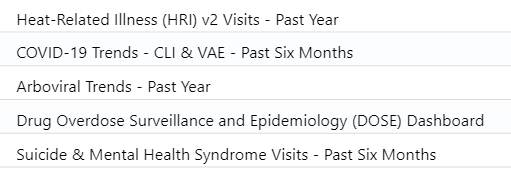
The ADHS SS Team has uploaded 5 myESSENCE dashboards (shown below) to the myESSENCE library so that all users can access them on their own. The dashboards will default to the geographic region the user has access to. Moving forward, we will upload any myESSENCE dashboards, created by ADHS, to the library instead of adding users to individual dashboards.
Follow these steps to access the national myESSENCE library and download your dashboard(s).
The ADHS SS Team has uploaded 5 myESSENCE dashboards (shown below) to the myESSENCE library so that all users can access them on their own. The dashboards will default to the geographic region the user has access to. Moving forward, we will upload any myESSENCE dashboards, created by ADHS, to the library instead of adding users to individual dashboards.
- Log into ESSENCE
- Click on the myESSENCE tab
- Click on the Library button
- Type in "Arizona Department of Health Services" in the search bar
- Note: Users can download any dashboard in the library, not just those uploaded by ADHS
- Select the checkbox next to the dashboard of interest
- Click the Download button
- Select "OK" when you see the "Tab download successful" message
- A new tab should appear at the top for the user to view the dashboard
Please email syndromicsurveillance@azdhs.gov if you have any questions!
NSSP myESSENCE dashboard training video